#206969 - 2013-03-26 05:17 PM
 WMIQuery crashes on some computers |
KIXKicks

Starting to like KiXtart

Registered: 2002-07-26
Posts: 177
Loc: Vancouver, WA
|
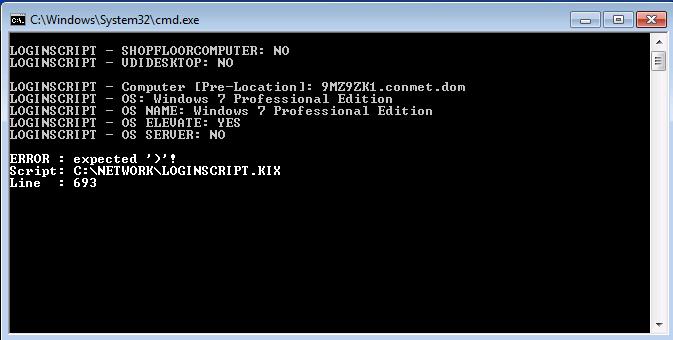
WMIQuery is crashing (see attached file) on some computers, yet works on others.
It crashes in this statement in our login script, if I comment it out it crashes on the next WMIQUERY statement.
Of other note, we recently rolled out new versions of KIX32.EXE & KIXFORMS.DLL:
KIX32.EXE version 4.63
KIXFORMS.DLL version 2.47.5
$SERIALNO = WMIQUERY("SERIALNUMBER", "WIN32_BIOS")[0]

If $SERIALNO < " "
	$SERIALNO = WMIQUERY("SMBIOSASSETTAG", "WIN32_SYSTEMENCLOSURE")[0]
EndIf
Using Glenn's UDF
Function WMIQuery($sWhat, $sFrom, Optional $sComputer, Optional $sWhere, Optional $x, Optional $root, Optional $pAuth)
	Dim $, $sQuery, $objEnum, $sValue, $TMP, $SystemSet, $objInstance, $objLocator

	$sComputer = Trim(Join(Split($sComputer,'\'),''))
	If Not $sComputer Or $sComputer = @WKSTA
		$sComputer = '.'
	EndIf

	If Not $root
		$root = '\root\cimv2'
	EndIf

	$sQuery = 'Select ' + $sWhat + ' From '+ $sFrom

	If $sWhere And $x
 		$sQuery = $sQuery + " Where " + $sWhere + " = '" + $x + "'"
	EndIf

	If $pAuth
    		$SystemSet = $pAuth
  	Else
    		$SystemSet = GetObject('winmgmts:{impersonationLevel=impersonate}!\\' + $sComputer + $root)
    		If @ERROR Or Not $SystemSet
      			Exit Val('&' + Right(DecToHex(@ERROR), 4))
    		EndIf
  	EndIf

	$objEnum = $SystemSet.ExecQuery($sQuery)
	If @ERROR Or Not $objEnum
		Exit VAL("&" + Right(DecToHex(@ERROR), 4))
 	EndIf

	For Each $objInstance In $objEnum
		$ = Execute(Chr(36) + 'sValue = ' + Chr(36) + 'objInstance.' + $sWhat)
		If VarType($sValue) & 8192
			$Tmp = $Tmp + '|' + Join($sValue,'|')
		Else
			$Tmp = $Tmp + '|' + $sValue
		EndIf
	Next

	$WMIQuery = split(substr($Tmp,2),'|')
	Exit Val("&" + Right(DecToHex(@ERROR), 4))
EndFunction
Description: WMIQuery Error Message
|
|
Top
|
|
|
|
|
#206981 - 2013-03-27 01:22 PM
Re: WMIQuery crashes on some computers
[Re: Allen]
|
Glenn Barnas
KiX Supporter


Registered: 2003-01-28
Posts: 4403
Loc: New Jersey
|
KixKicks,
Please log the error returned from the WMI call, something like If @ERROR
'WMI:' + @ERROR + ' / ' + @SERROR + @CRLF
EndIf
The WMIQuery code hasn't changed since 2009 and was originally written in 2001 (and - it's Radimus' UDF, I just added the authentication logic  ). Since we haven't seen issues with the code in all that time, I have a feeling that something changed in Kix itself, or with a recent O/S patch.
Can you try running with Kix 4.53 on one of the problem systems and see if the problem persists? That would help narrow things down to Kix.
Also, using this UDF in a login script might not be the best method. This UDF instantiates the connection for each individual query, which can take a fair amount of time. For example, my login script completes a dozen mappings in seven-eighths of a second, a single call to WMIQuery can take 400ms or more. I found this when I called WMIQuery just nine times in a script. Rewriting the code to instantiate the WMI object and then make the 9 queries in sequence in the single UDF completed all queries in about 550ms compared to over 3.5 seconds! Look at my WMINicInfo UDF for an example - the top half of the UDF should look familiar!
Glenn
_________________________
Actually I am a Rocket Scientist! 
|
|
Top
|
|
|
|
|
#206986 - 2013-03-27 09:41 PM
Re: WMIQuery crashes on some computers
[Re: Glenn Barnas]
|
KIXKicks
Starting to like KiXtart
Registered: 2002-07-26
Posts: 177
Loc: Vancouver, WA
|
Sorry Glenn, I couldn't get it to crash even with changing the code back (note the test computer had be rebuilt twice due to this issue). I couldn't get the 4.53 version of KIX32.EXE to work in our environment (probably cause of the recoding I did to get 4.63 to work).
Here is the code I used:
        $SERIALNO = WMIQUERY("SERIALNUMBER", "WIN32_BIOS")[0]
	If @ERROR
		Shell '%COMSPEC% /C "ECHO WMI_BIOS: ' + @ERROR + ' / ' + @SERROR + ' >>' + $INSTALLDIR + '\Debug_LS.txt 2>&1"'
	Else
		If $SERIALNO = " "
			$SERIALNO = WMIQUERY("SMBIOSASSETTAG", "WIN32_SYSTEMENCLOSURE")[0]
			If @ERROR
				Shell '%COMSPEC% /C "ECHO WMI_SYSTEM_ENCLOSURE: ' + @ERROR + ' / ' + @SERROR + ' >>' + $INSTALLDIR + '\Debug_LS.txt 2>&1"'
			Else
				Shell '%COMSPEC% /C "ECHO WMI_SYSTEM_ENCLOSURE: ' + @ERROR + ' / ' + @SERROR + ' >>' + $INSTALLDIR + '\Debug_LS.txt 2>&1"'
			EndIf
		Else
			Shell '%COMSPEC% /C "ECHO WMI_BIOS: ' + @ERROR + ' / ' + @SERROR + ' >>' + $INSTALLDIR + '\Debug_LS.txt 2>&1"'
		EndIf
	EndIf
On this computer, I get:
WMI_BIOS: 0 / The operation completed successfully.
|
|
Top
|
|
|
|
Moderator: Jochen, Allen, Radimus, Glenn Barnas, ShaneEP, Ruud van Velsen, Arend_, Mart
|
0 registered
and 2870 anonymous users online.
|
|
|